
 Deutsch
 English
 Español
 Française
 Italiano
 Nederlands
 Türkçe
 Română
 Čeština
 Magyar
Sales features
One of your customers called your office two minutes ago with an important question about a major joint project. You're out of the office, but that's not a problem. You've seen the missed call and call the customer straight back. The customer wants to reschedule a meeting with you, no problem, you enter this information directly into the system.
How does that work?
As a central system, CAS genesisWorld is the foundation of an effective and efficient sales process. It enables you to record and optimize customer values and follow up on leads fast and effectively. And thanks to mobile access, you will always have all data at your finger tips no matter where you are. The software takes over routine tasks which leaves you more time to concentrate on your customers and leads.
The functions in detail
Opportunities
Opportunities are the cornerstone of sales, they bring efficiency and planning security. As a central sales element, they provide you with a way of tracking leads from the first enquiry to the closing of a sale.
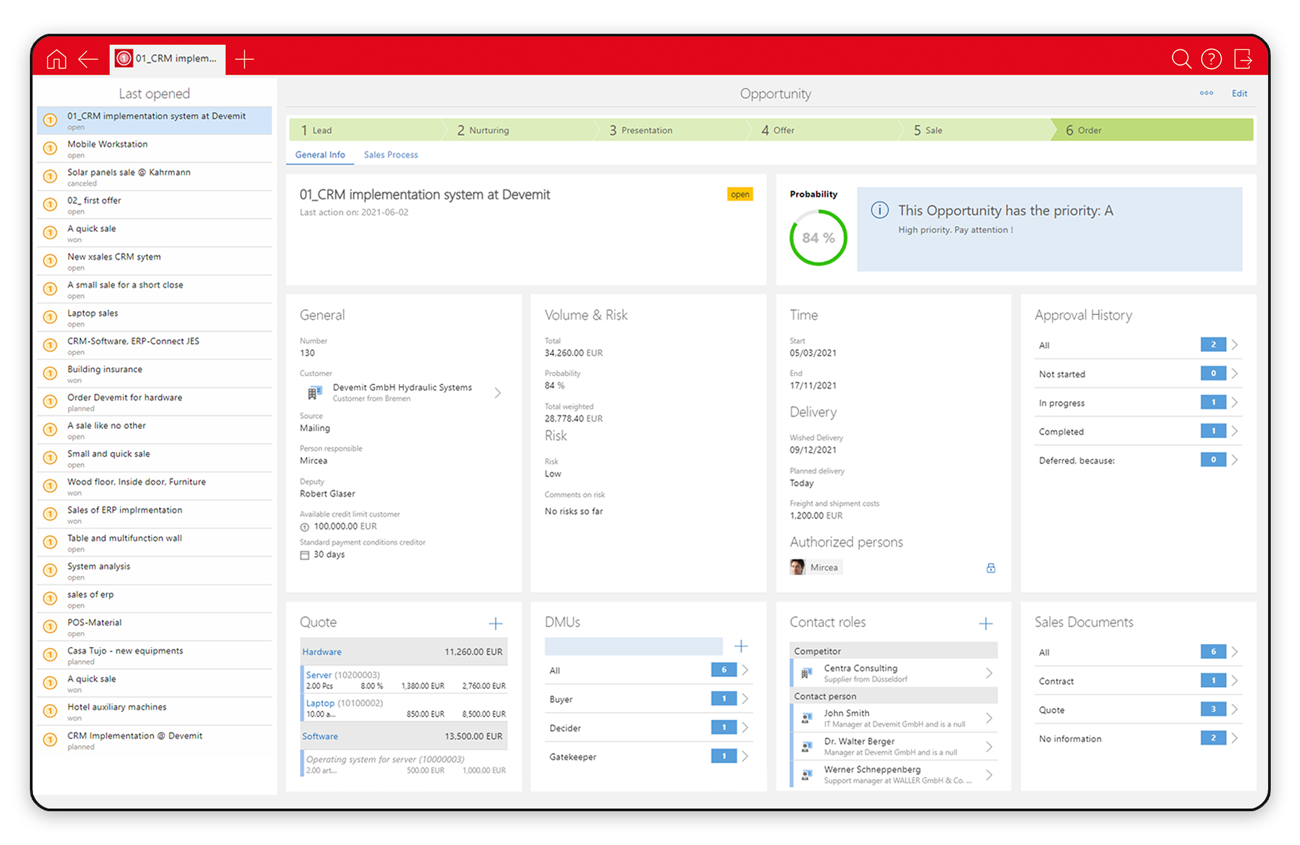
- Opportunities map the whole sales process: you can track every action with respect to a prospect - from making a note of a prospect (lead) through to the offer phase, closing the deal and after sales.
- Our software provides intelligent functions that support sales activities. For example, the "Next activity" function always shows the next required action, be it a phone call, an appointment or returning a call.
- To make life even easier, you can search opportunities using filters.
- Make exact turnover forecasts by analyzing all of your data. The results can be presented in report form or copied into Microsoft Excel.
- From an opportunity you can send e-mails, write letters or call a customer.
- Another nice feature is the ability to carry out a SWOT analysis within the opportunity so that you can locate your most profitable customers.
Documents & Correspondence
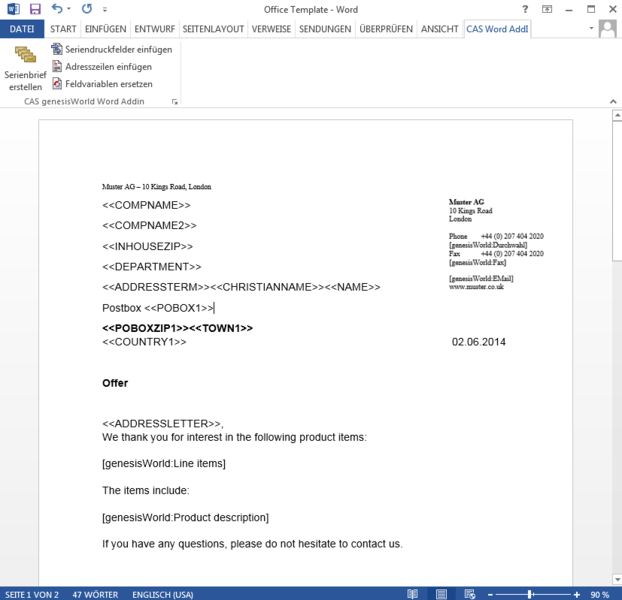 |
- Manage your documents, for example, letters, e-mails or contracts all in one central CRM database.
- Use default templates to save valuable time in your day-to-day correspondence. Any document you send out is always conform to corporate style.
With personalized form letters or e-mails, you can add that personal touch to your communications with targeted customers. - Integrating Microsoft Office products allows you to compose or edit documents directly in Microsoft Office.
- By using drag-and-drop, you can move documents from Microsoft packages to CAS genesisWorld where they are created as CAS genesisWorld data records; they can then also be linked with each other or to other data records in CAS genesisWorld.
- Using categories such as offer or log, you can classify documents, some documents can even be organized quickly into lists.
- Documents can be archived in the customer dossier.
- If you use version management, then earlier versions of a document remain intact.
- And thanks to the full text search employees can find every document.
Sales pro module
The Sales pro module provides even more sales support by exploiting and expanding the opportunity functions.
- Manage your leads using a framework of clearly defined sales processes: from the first contact report, through to the qualified lead phase, the sale itself and finally to after sales support.
- Sales pro provides you with a seamless sales workflow with method. Create your own sales structures by creating a criteria catalog, marking clear sales regions, actively considering your competitors and maintaining your product catalog.
- Create reliable forecasts using automatic probability calculations.
- Comprehensive analyses are possible with the special opportunity view.
- Being able to create sales reports at the touch of button saves your sales staff time.
- Keep an eye on the competition. Knowing your competition's strengths and weaknesses in sales is essential, so with the possibility of recording such information you will be able to react accordingly.
- Manage relevant contact persons in your CRM software. Knowing the decision makers, and their attitudes and influences, makes it easier to win an order.
- Integrated document management features means that you have immediate access to all offers, contracts and invoices.
- The multicurrency concept supports international sales.
- Sales pro supports different sales structures such as indirect sales.
The automatic notification and action service
Use the notification and action service to automate standard processes. Typical uses include notifying sales support when field staff have changed a customer file, and creating a caller log when certain events are used as triggers such as with "Create opportunity".
- You can define individual rules that determine which events trigger which actions automatically.
- Set up various processes and routine tasks automatically, for example, sending a welcome e-mail when a lead becomes a customer.
- Monitor your data and set up automatic "reactions" when, for example, a data record is changed.
- Phone calls and opportunities can be easily created as follow-up actions for a data record.
- Monitor values as small as field values within single data records. For example, a "Field value accomplished" check could be set up which then triggers a notification when turnover exceeds €10,000.
Mobility

Many employees need to access customer data while on the move. They want to access information from home, from their mobile devices or via Internet. The mobile CRM solutions for CAS genesisWorld provide you with comprehensive functions for mobile working.
- CAS genesisWorld Web allows you to keep working while mobile, whether in your browser or with the CAS genesisWorld Mobile Apps: Now available for iOS, Android and Microsoft Windows these are the best solutions you will find for mobile working. You will feel right at home when using CAS SmartDesign® Technology as it will enable you to work with the mobile device of your choice to access your CRM data. This is because of its responsive operating concept which we have clothed in the familiar CAS genesisWorld user interface.
Using our mobile solutions you can use the dossier to access and edit: appointments, tasks, phone calls and you can even forward e-mails directly from the app. Other features include, the ability to comment and archive both incoming and outgoing phone calls and e-mails centrally in CAS genesisWorld. - Replication and synchronization solutions
Replication helps you to synchronize information between different locations, or between laptops and head office.
Thanks to Mobile sync, you can access all important CRM data on almost all devices when offline. When synchronizing bidirectionally, changes can be made anytime and anywhere.
Quote configurator
- Using CAS Configurator Merlin you can configure products perfectly and create quotes at the touch of a button.
- The module is based on four phases: Finding the product you want, Configuration, Pricing and Quote creation.
- Rules and technical capabilities are used to ensure that product variants are described accurately and that they are fit for purpose. You can rest assured that product quotes are technically feasable, priced correctly and that any discounts have been calculated correctly.
- The quotes you produce are stored in CAS genesisworld from where they can be used again in any further sales processes.


